
Make Mockups
in Minutes
Imagine creating polished product images and short marketing videos in less than a minute. AI Mockup Maker is the WooCommerce mockup plugin that lets you generate high‑quality mockups and a video from a single photo. No photo shoots, no editing software — just write a prompt, select how many mockups you need, pick your product photo and let the AI work its magic.
Let us mock it up for you!
How It Works – 4 Simple Steps
-
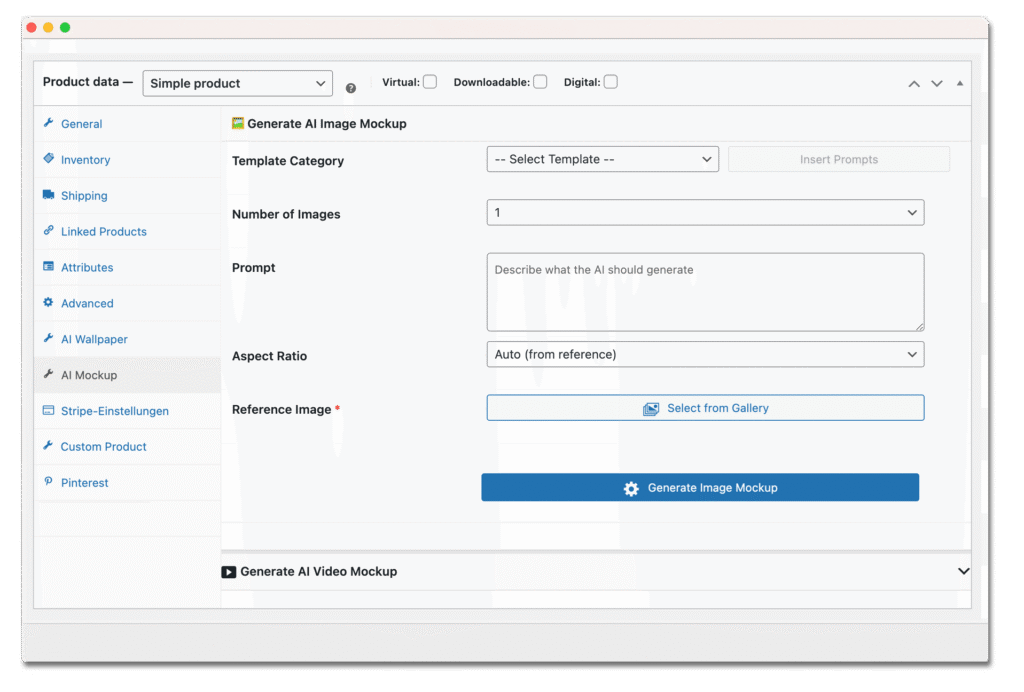
Describe – Start by writing a short prompt that tells the AI what atmosphere or scene you want (e.g. “industrial loft kitchen” or “cozy cabin living room”).
-
Decide – Select how many mockups you need (up to ten per product) and choose the desired aspect ratio.
-
Upload – Pick your product photo from the WooCommerce media gallery. AI Mockup Maker uses this reference to embed your design into each scene.
-
Done – Click Generate. The AI renders your images , attaches them to the product gallery and assigns titles, alt text and descriptions automatically.
Don’t Waste Time on Manual Image Creation
Creating mockups the old‑fashioned way means booking photographers, editing designs and uploading files one by one. If you run a print‑on‑demand shop or a lean startup, that process can take hours per product and hundreds of dollars per photo shoot. AI Mockup Maker eliminates this drag by generating images and videos on demand for a few cents per file, allowing you to launch more products faster.
- Try before you buy! -
Test the plugin 7 days for free — no credit card required.
Why I Built AI Mockup Maker
A Creator’s Story –
Hi i’m Konstantin, founder of Wootools.io
When I decided to list over 100 custom wall‑art products in my WooCommerce shop, I hit a wall. Existing design plugins were expensive and complicated, and creating mockups took hours per product — a nightmare for any print‑on‑demand business. I taught myself AI development, built my own design tool in two weeks and discovered Sunra.ai’s powerful image API. Suddenly each image cost only a few cents and I could generate dozens of scenes per product. I added video creation, automated everything and turned my frustration into a solution that helps other entrepreneurs save time and money. That solution is AI Mockup Maker.
Frequently Asked Questions
What is AI Mockup Maker?
AI Mockup Maker is a WooCommerce plugin that uses artificial intelligence to generate photorealistic product mockups and short marketing videos from a single reference image. It streamlines the entire mockup workflow by handling image generation, cropping, and product assignment directly inside your WooCommerce dashboard.
How does the plugin generate images and videos?
The plugin connects to the kie.ai API (powered by Google Gemini) to interpret your descriptive prompt, merge your design onto different backgrounds and render high‑resolution images. Once the images are created, the built‑in video engine compiles them into a short 5‑second oder 1o-seconds clip — ideal for TikTok, Instagram Reels or product pages.
What do I need to get started?
You need only the Plugin and a APi token from kie.ai
Do you have a free plan?
Yes you can use our Plugin for free but on the free plan you can only generate 5 Mockups in 24 Hours.
Do I have to keep the page open during generation?
We’ve got built-in support for your favorite page builders:Bricks Builder – the teams preferred way to use WordpressElementor – the most popular page builder for WordPressDivi – fully compatibleGutenberg – WordPress’s native editorAnd here’s the best part: thanks to our data attribute system, you can use Memberstack with pretty much any page builder out there, or even custom-coded sites. We’re flexible like that!
How many mockups and videos can I create per product?
AI Mockup Maker creates your mockups and videos in the background over the kie.ai API . You can navigate away or continue editing other products while the job runs. A Jobs dashboard shows the status and lets you view completed mockups when they’re ready.
Does it work with any WooCommerce theme?
AI Mockup Maker is designed to be theme‑agnostic. It integrates seamlessly with standard WooCommerce installations and should work with most themes. If you encounter a compatibility issue, our support team is available to help.
How much does each image cost and how is the API billed?
You’ll need a Sunra.ai API token, which charges per generated image. The cost is only a few cents per image and is billed by Sunra.ai directly. The plugin itself doesn’t add any per‑image fees; once you have a licence, you can generate unlimited mockups and videos.